At the office, we have 12 parking stalls that provide free charging for electric vehicles. This is a nice perk, but unfortunately, there are a lot of EV owners. Finding a parking stall can be very difficult! Someone has thought of this, and very kindly placed cameras looking down on the stalls from the 4th floor so that those interested can see if any chargers are available without leaving the comfort of their desk.
I find having to check the cameras to be a bit of a burden though, so I thought it would be a good excuse to learn a bit more about computer vision by writing a small program to detect open stalls automatically, and notify me. I’ve never really done much in this area and thought it would be interesting.
Machine Learning
Using some sort of LLM seemed like the most obvious approach. I used the ultralytics library in Python and tried it’s built model which didn’t do great.
I thought a more tailor-made model would perform better. I looked on roboflow for models that were trained on aerial photography of parking lots. I uploaded a screenshot to multiple models and found the one with the best performance.
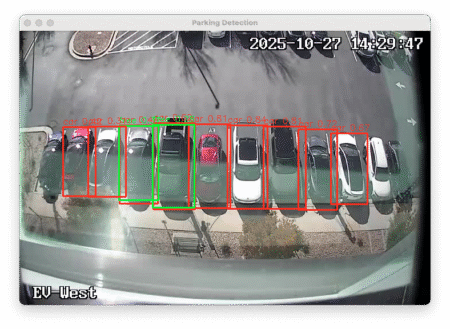 The model seemed to do pretty well, however it was having troubles detecting cars on the very edges. I suspect this is because of the skewed geometry from the lens distortion, but I’m not really sure. I also had a lot of overlapping results and false positive and false negatives.
I tried optimizing it using a few different methods. I tried cropping the image down to the bare minimum so that there was less to distract the LLM when looking for predictions. This didn’t help the edge stalls in being detected.
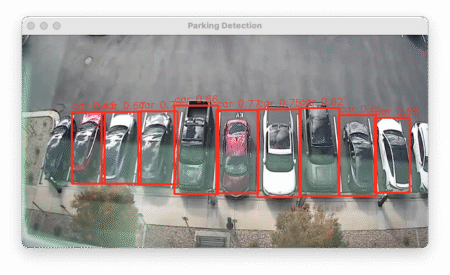 I also tried cropping each stall individually and running the model on each independently. This made results even worse! I was now getting a lot of false positives on the parking stripes and false negatives on cars. No effect on the far left stall either.
I left it running and started saving screenshots periodically as well as what the predictions are. During this time, I captured 141 images and predictions. Of those, 52 were not accurate predictions.
Accuracy: 63%
That was a lower accuracy than I was hoping for. I had a couple ideas on how to move from here. One is to collect images for a long enough time to train my own model. Ideally, I’d want to do this after collecting samples for a year in order for all possible seasons and lighting conditions to be included.
The second idea is to go more low-tech, and look into traditional image analysis techniques.
Traditional Image Analysis
For doing image analysis I used the Python library, cv2 along with numpy.
Average Color Detection
One method is to take the average color for a sample area of asphalt and compare against the average color in each parking spot and see how different they are. This is an easy check to implement, but there are many way in which this can fail. For example: Shadows, wet asphalt, car driving through sample area, grey cars.
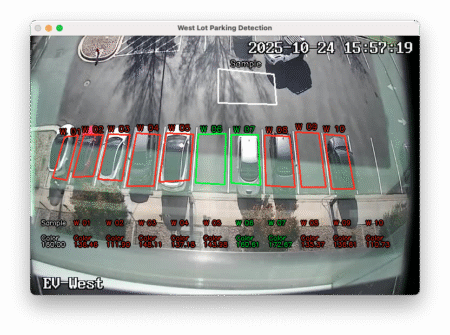 Unsurprisingly, this was a fairly abysmal result. It could probably be tuned a bit, but I don’t think it would ever be viable.
Accuracy: 25.78%
Pixel Brightness Uniformity
By looking at the pixel brightness and getting the standard deviation, we can see how uniform the pixels in an area are. Asphalt is fairly uniform, but a car with windows and paint, and glare are not very uniform. This is also pretty easy to implement, and works fairly well. This method also has similar pitfalls to the previous method; Shadows, wet asphalt, and cars that are low contrast colors.
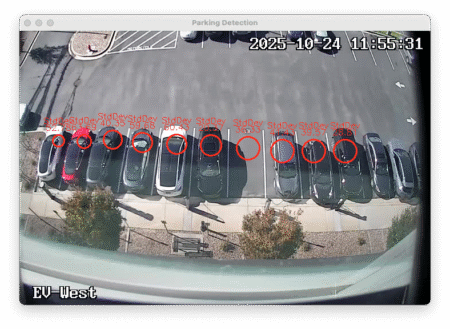 Accuracy: 51.92%
Hue Uniformity
Another method is to look at the hue uniformity. My goal here was to eliminate the issue of shadows, this way a parking spot half in light and half in shadow would have a higher uniformity than a car which has features/windows etc. Similar issues apply here as well, such as dull-colored cars, bad lighting.
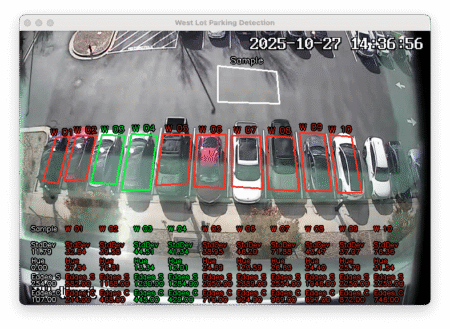 This ended up being a huge step backwards at only identifying 229 of my 630 images correctly.
Accuracy: 36.35%
Edge Detection
Rather than looking at color uniformity, or brightness uniformity, what if we looked for image uniformity by detecting edges? This is also easy to implement in Python using the cv2 library. After dialing in a threshold, the accuracy was astoundingly good. It’s particular weakness is where there are intricate shadows or splotchy textures from rain/water. False negatives are less likely than false positives.
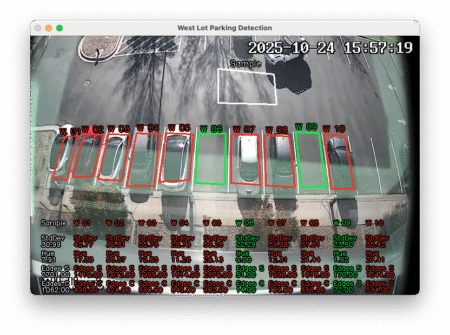 Accuracy: 95.57%
Notifications
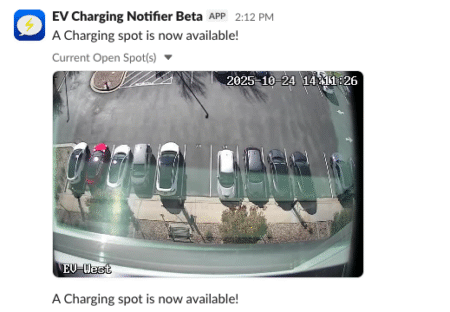
The final step was to create a Slackbot that would notify me when a parking spot becomes available. I had never done this before, so I followed a tutorial.
I limited my Python script to only send notifications on work days and during normal work hours. It also only notifies me when it goes from no spots available to 1 or more spots available.
Conclusion
The system is working well enough in it’s current state. I intend to revisit this project in a few months after we get into winter. I suspect that the current edge detection method will fail when we start having snow on cars. I am saving screenshots periodically in order to build up training data to attempt creating my own model for this particular problem. In the mean, I should be able to charge at work more often!